
Forge
Every Job, Fully Visible From Day One.
Forge gives every project its own operational record — job site, scope, crew size, hours, and status — and ties it live to the people and time already in the system. Ask who's assigned, where the job stands, or how many hours are left. The answer is always current.
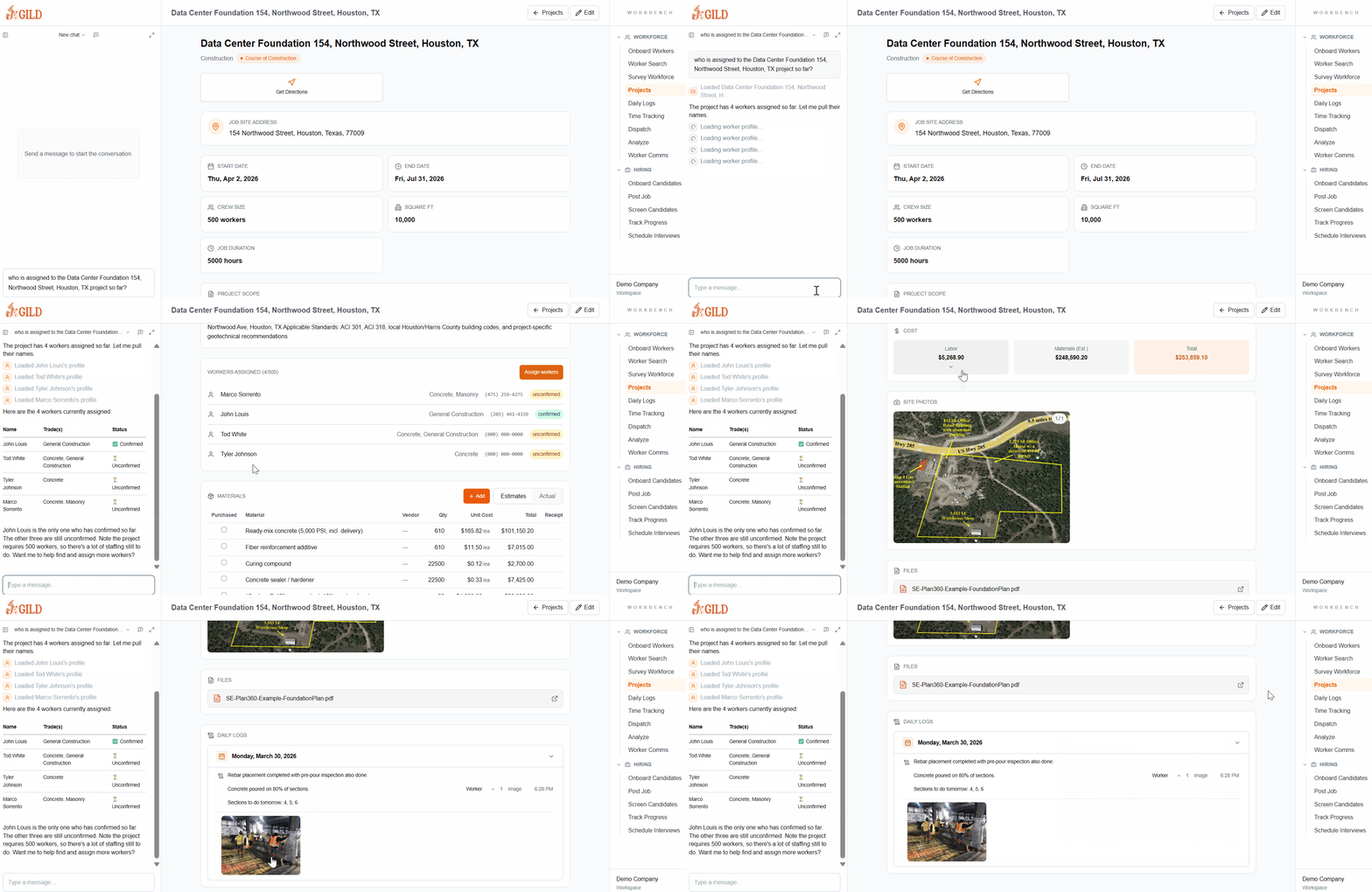
Shown aboveAI query: “Who is assigned to the Data Center Foundation 154, Northwood Street, Houston, TX project so far?”
The Job Record That Runs With The Job
Every project in Forge is a live operational record — not a static card. As crews are dispatched, hours are logged, and work progresses, the project stays current automatically.
Project Record
Every Detail In One Place
Job site address, trade type, crew size, square footage, start and end dates, job duration, and project scope — defined once and accessible by everyone who needs it.
Live Crew Visibility
Always Know Who Is On The Job
Crew assignments connect directly to dispatch and time tracking. Ask who's assigned to any project right now and get an answer from live data — not a spreadsheet.
AI Project Queries
Ask Anything About The Job
Type a question like "who is assigned to the Data Center Foundation project so far?" and Forge answers instantly from the current record — no status meeting required.
Automatic Status
Status Follows The Work
Projects move from pre-construction through course of construction to complete as field activity is logged. No manual updates needed to keep the record current.
One Record. Every Detail. Always Current.
Define The Job
Set up a project with address, scope, trade type, crew size, square footage, and duration. Everything ops and the field need is in one place from the start.
Staff And Dispatch
Assign workers directly from the project record. Dispatch flows through the same system — no toggling between tools to put crews on a job.
Ask What You Need
Type a question about any project — who's assigned, how far along it is, what's been logged — and Forge answers from live data.
- Project records include job site address, scope, start and end dates, crew size, and square footage
- Crew assignments link directly to dispatch and time tracking — no duplicate entry
- Project status updates automatically as work progresses — pre-construction to course of construction to complete
- Ask the AI who is assigned, how many hours have been logged, or what's left — in plain language
- Daily logs and time entries roll up to the project automatically
- Manage projects of any size — from small service jobs to 500-person construction sites
Stop Reconciling The PM Tool With The Field
When project details live in one system and field activity lives in another, the PM is always working from stale numbers. Forge connects the plan to what's actually happening on site.
- No more chasing foremen to find out who's on a job
- No more spreadsheets to reconcile labor hours against the project budget
- No more status meetings to learn what the system should already know
- No more gaps between what was scoped and what was actually worked
See Project Management In Forge
Get a personalized walkthrough showing how Forge handles project management for your operation.
Set up your workspace, tour every module you want, and get started with Gild today
By submitting, you agree to our Terms and Privacy Policy.
Or Talk To Our Team
Schedule A Call