Forge
Ask What A Job Costs. Get The Answer Now.
Job costing shouldn't require a Monday morning spreadsheet. When time, dispatch, and materials all run through Forge, the cost picture builds itself — and anyone on the team can ask about it by name.
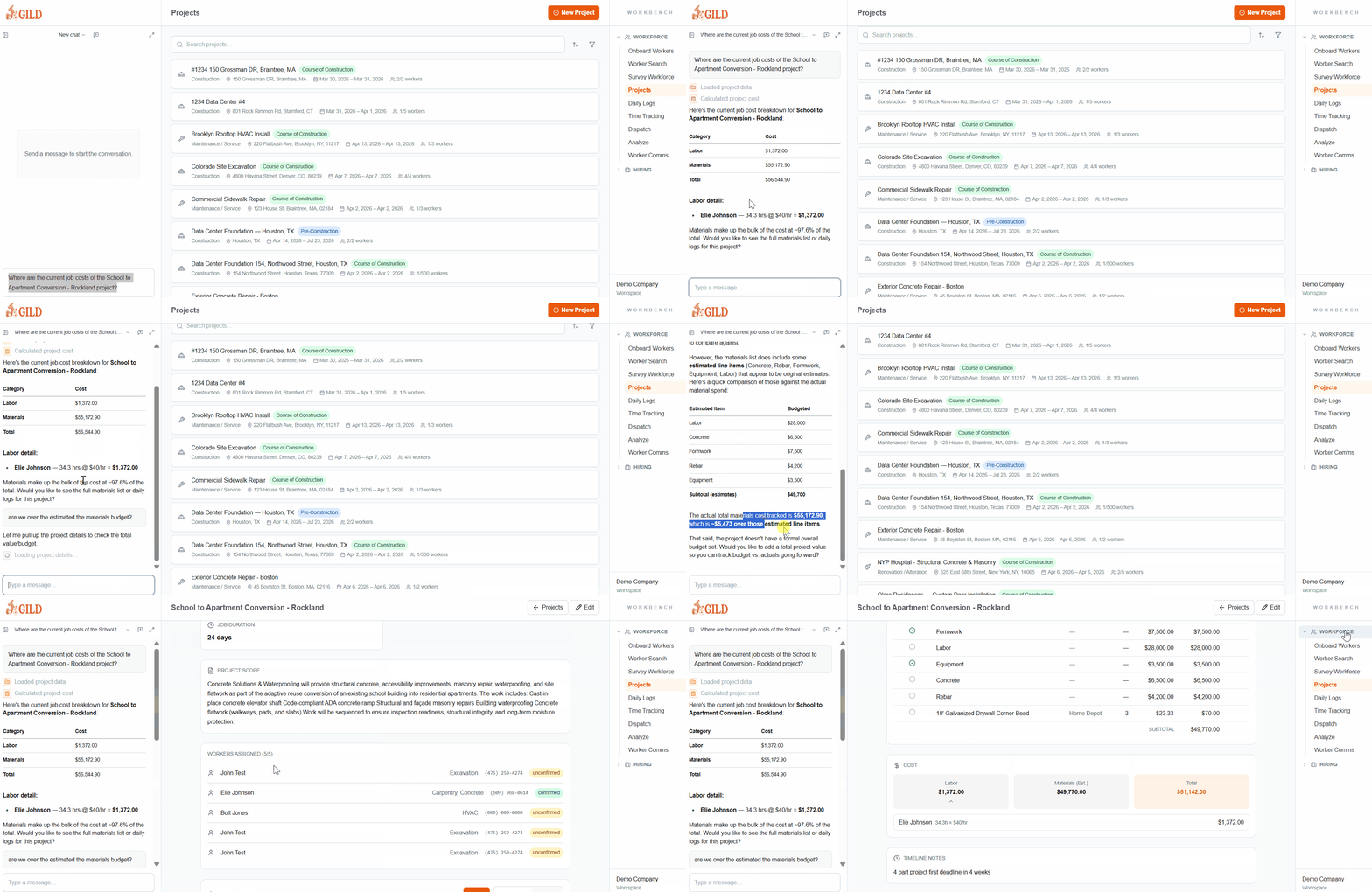
Shown aboveAI query: “Where are the current job costs of the School to Apartment Conversion - Rockland project?”
Job Costs That Build Themselves
When time tracking, dispatch, and materials all run through Forge, job cost data accumulates automatically — and you can query any of it in plain language.
AI Cost Queries
Ask About Any Job By Name
Type a question like "Where are the current job costs of the School to Apartment Conversion project?" and Forge answers from live data — no report, no export, no waiting.
Live Labor Attribution
Hours Become Costs Instantly
Every clock-in is tied to a project. Fully loaded labor rates flow into job cost the moment time is logged — not at the end of the week.
Budget vs. Actual
See The Gap While You Can Still Close It
Compare planned and actual costs during the job. When a project is trending over budget, you see it in time to act — not after the invoice goes out.
Cross-Project Visibility
Every Active Job In One View
The project list shows every job with its status, crew count, and date range. Cost data rolls up the same way — no switching tools to see the full picture.
Costs Built From Field Data, Not Reconstructed From It
Time Flows In Automatically
Clock-ins, geofence verifications, and dispatch assignments attribute labor to the right job as work happens.
Ask In Plain Language
Type a question about any project's costs directly in Forge. The AI pulls from live data — no pivot tables, no exports.
See Budget vs. Actual Now
Compare planned labor and material costs against what's actually been logged — while the job is still running.
- Labor hours and burden rates flow into job cost the moment time is logged
- Costs are attributed to specific projects — not allocated after the fact
- Ask about any project's current costs from the AI chat sidebar — no report needed
- Budget vs. actual visibility during the job, not after the invoice goes out
- Dispatch and scheduling data tie crew time to the right job automatically
- Reduce month-end reconciliation by capturing costs at the source
Stop Reconstructing Job Costs After The Fact
Most contractors piece together job costs from three systems and a spreadsheet — usually too late to do anything about it. Forge builds the picture from field data as work is performed.
- No more month-end scrambles to allocate labor across jobs
- No more exporting timesheets to figure out what a project actually cost
- No more margin surprises after the job closes
- No more 'we'll sort that out in accounting' on material overruns
See Job Costing In Forge
Get a personalized walkthrough showing how Forge handles job costing for your operation.
Set up your workspace, tour every module you want, and get started with Gild today
By submitting, you agree to our Terms and Privacy Policy.
Or Talk To Our Team
Schedule A Call